
Digital LegacyJuly 2026 · 5 min read

The Three Settings That Decide Your Digital Afterlife

Apple, Google, and Facebook each have a legacy tool built in. Setting up all three takes about 30 minutes. Almost nobody does it. Here's the walkthrough.

Three toggle switches with the third one flipped on, illustrated in bone white on a dark background

In This Article

Your entire photo library. Twenty years of email. Every message you’ve ever sent.

When you die, all of it sits behind a login screen, and your family stands on the other side holding a death certificate that the login screen cannot read. We’ve covered what that fight looks like: months of paperwork, sometimes court orders, often permanent loss.

Here’s the part almost nobody acts on. The three companies holding most of your digital life built tools that skip the entire fight. Each takes about ten minutes to set up. Fewer than one in ten people have touched them.

Thirty minutes, three toggles. This is the walkthrough.
Apple Digital Legacy: the photos

If your photos live anywhere, they live in iCloud, which makes this the highest-stakes toggle of the three.

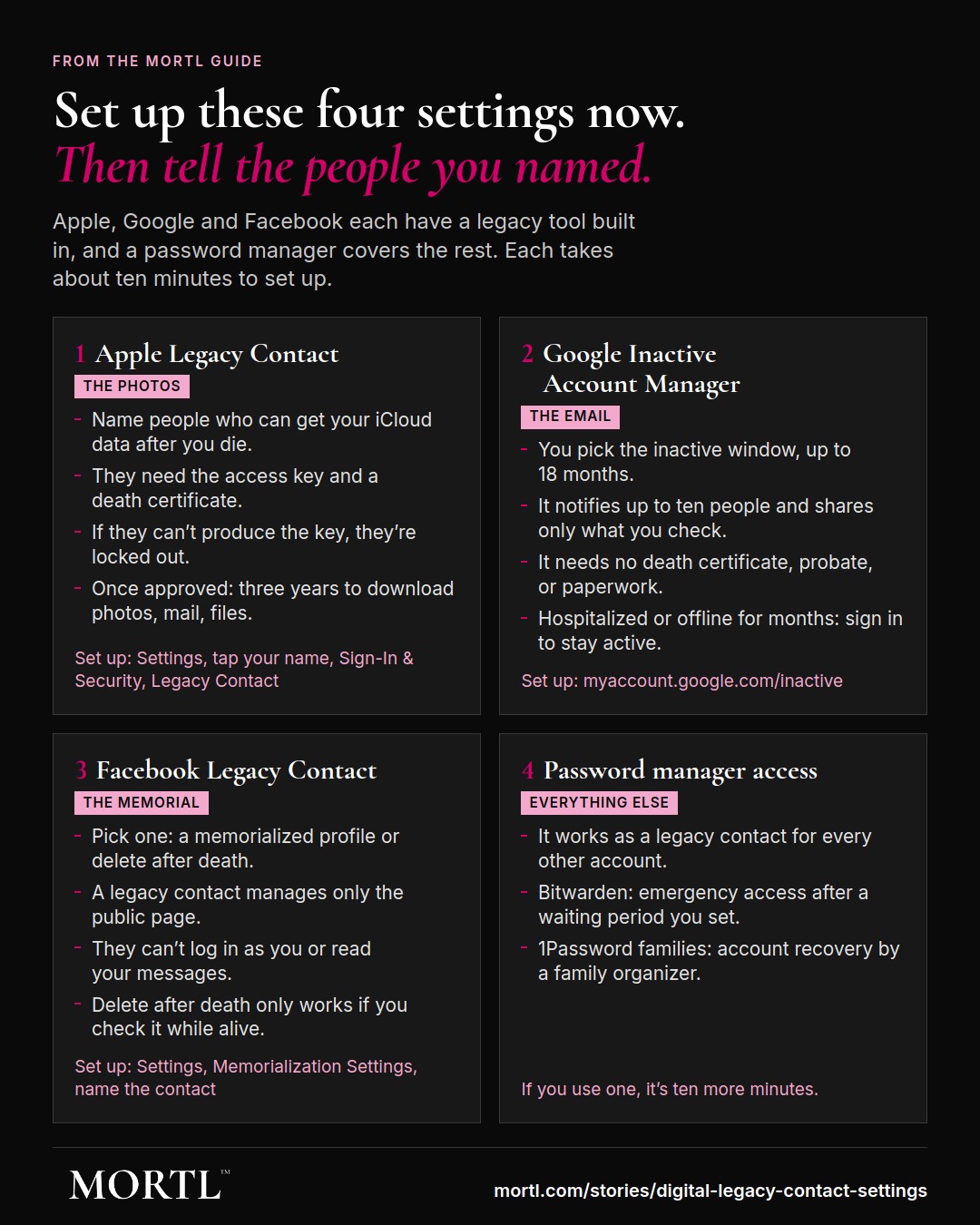
Since iOS 15.2, Apple lets you name Legacy Contacts, people who can access your iCloud data after you die. Setup lives at Settings, tap your name, Sign-In & Security, Legacy Contact. You can name up to five people.

Pay attention to the mechanism, because it’s the part people miss. When you add someone, Apple generates an access key, a QR code. Your contact needs two things to unlock your account later: that key, and a death certificate. If they can’t produce the key, they’re locked out. So store it deliberately: Apple can save it to your contact’s own Apple account if they’re on a modern iPhone, or you print the PDF and put it with your estate documents. A legacy contact without the key is useless.

What they get, once approved: photos, messages, notes, mail, contacts, files, essentially the personal archive, for a limited window, three years, to download what matters. What they don’t get, ever: your Keychain passwords, payment information, and your licensed media, because you never owned those movies anyway.

Google Inactive Account Manager: the email

Google’s tool is older and cleverer, and it runs on a different trigger: not a death certificate, but silence.

Setup is at myaccount.google.com/inactive. You pick an inactivity window, three to eighteen months. If your account goes quiet that long, Google tries to reach you first, repeatedly. No answer, and the machine assumes the worst and executes your instructions.

Those instructions: notify up to ten people you’ve chosen, and share the specific products you’ve selected with them, Gmail, Photos, Drive, whatever you check off. Each contact gets access to download exactly what you granted, nothing more. And there’s a delete-everything option: tell Google to delete the whole account after the process runs.

The inactivity trigger is both the feature and the bug. Feature: it needs no paperwork, no probate, no death certificate. It just works, even if your family doesn’t know it exists. Bug: it’s slow by design, your family waits out the window you chose, and it can misfire on the living, so if you’re ever hospitalized or offline for months, answer the check-in email. Choose the three-month window unless you have a reason not to.

Facebook Legacy Contact: the memorial

Facebook’s dead outnumber most countries’ living, so Meta has the most developed memorialization machinery. It offers you a binary choice, and choosing is the whole assignment.

Option one: memorialization. Your profile stays up with “Remembering” above your name, and your designated Legacy Contact can manage the memorialized profile: pin a tribute post, update the profile photo, respond to friend requests, request removal of the account later. What they cannot do is log in as you or read your DMs. They manage the public page and nothing private. Setup: Settings, Memorialization Settings, name the contact.

Option two: delete after death. Same settings screen, one checkbox, and when Meta learns you’ve died, the whole account evaporates. If you don’t want your profile to stay up as a memorial, this checkbox is the answer, and it only works if you check it while alive.

Instagram, same company, fewer options: profiles can be memorialized or removed on proof of death, but there’s no legacy contact managing anything. The full social media picture is here.

The fourth setting nobody mentions

The three official tools cover Apple, Google, and Meta. Your other two hundred accounts hide behind one door: your password manager.

1Password, Bitwarden, and their peers all offer an emergency access or recovery mechanism, a designated person who can request access, with a waiting period you control. Set it up and you’ve effectively created a legacy contact for everything else you touch. If you use a password manager and haven’t configured this, it’s ten more minutes. If you don’t use a password manager, this is the sign.

One deliberate omission from this article: your phone’s unlock PIN. Sharing it solves everything and creates its own risks. That’s a judgment call between you and your people, so make it a decision instead of a default.

Do it now, then say so

The tools only work if two things are true: you set them up, and someone knows you did. So finish the loop. Tell your legacy contacts they’re named. Tell them where the Apple access key lives. Write one line in your planning documents: “Legacy tools configured: Apple, Google, Facebook, password manager,” with the names.

Total elapsed time, all four: about half an hour. It’s the highest-leverage half hour in all of digital estate planning, and it’s free.

The bottom line

Apple guards your photos, Google guards your email, Meta guards your profile, and all three built a side door your family can use, if you unlock it in advance. Thirty minutes now, or your grieving family versus three terms-of-service departments later. You already know which one they’d pick.


Sources: Apple Support, “How to add a Legacy Contact for your Apple Account”; Google Account Help, “About Inactive Account Manager”; Meta Help Center, memorialization and legacy contact documentation. Interface locations current as of publication; companies move settings around. See our Sources & Methodology.

This article is education. Platform policies change; verify settings in your own account.

ShareX / Twitter

Keep Reading

Digital Legacy

What Happens to Your Digital Life When You Die

Your email, photos, social media, crypto, and subscriptions don't just disappear. Here's what actually happens. And what you can do about it now.

9 min read
Planning

What Happens to Social Media Accounts When You Die

Your social media accounts don't disappear when you die. Here's what happens to each platform. And what you can do now to make it easier on the people you leave behind.

12 min read
Digital Legacy

Your Crypto Dies With You

Self-custody means no password reset, no customer service, no beneficiary form. Billions of dollars are already locked away forever because someone died with the keys. Here's how to not join them.

6 min read

The Death Dispatch

More stories like this, weekly.

A newsletter about death you'll actually look forward to reading.